
Lenovo Laptop Screen Replacement in Indore: What You Need to Know
By Lenovo Service Center Indore · · 5 min read
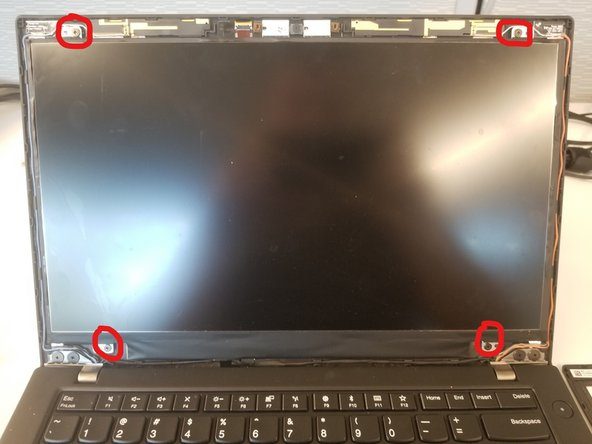
A broken screen is one of the most visible laptop problems, and also one of the most fixable. Whether you have an IdeaPad with a cracked panel, a ThinkPad with flickering lines or a Legion with a dim display, the right diagnosis tells you whether you need a new screen or something else entirely.
Common screen problems
- Cracks, shattered glass or dark ink-like patches that grow over time
- Vertical, horizontal or coloured lines running across the picture
- Flickering that changes when you move the lid
- A black screen even though the laptop is clearly on, with fan noise and lights
- A dim picture that you can only see under a torch, which points to a backlight fault
- Touch not working on a Yoga or other touchscreen model
The external monitor test
Connect your Lenovo to a TV or monitor using the HDMI port. If the external display works normally, the processor, graphics and motherboard are probably fine, and the fault sits in the panel, the display cable or the backlight. If the external screen is blank or distorted too, there is a deeper problem that needs a motherboard-level check, and a new screen would be money wasted.
Why the exact panel matters
Lenovo uses different panels across models. A suitable replacement has to match:
- Size, such as 14 inch or 15.6 inch
- Resolution: HD, Full HD or higher
- Connector type and pin count
- Panel type, for example IPS, and touch or non-touch
- Refresh rate on gaming models
What the replacement involves
Your files stay untouched, because the screen is separate from the storage drive.
- The fault is confirmed and the hinges and display cable are inspected.
- The correct panel for your exact model is matched.
- The bezel is opened carefully, the old panel is removed and the new panel is connected and fitted.
- Brightness, colour, lines, dead pixels and touch (if present) are tested.
Do and do not
- Do close the lid gently and keep pens, earphones and chargers off the keyboard before closing it.
- Do carry the laptop in a padded sleeve, not loose in a crowded bag.
- Do not keep using a laptop with loose glass, as small pieces can cut and the crack spreads.
- Do not press on the damaged area or try to peel the bezel yourself.
Time and price
For common models the panel is often available and the job can be done within a couple of hours. For rarer models the panel has to be arranged, which takes longer. The price depends on size, resolution, panel type and model, so a firm quote is only possible after we see the model number.
Lenovo screen replacement in Indore
Send us a photo of the damage and your model number on WhatsApp, or visit our Lenovo service center near Kalani Nagar Square. Call 9893530207 for a quick assessment.
Frequently asked questions
Can a cracked screen be repaired without replacing it?
No. Cracked glass and damaged LCD layers cannot be repaired, so the panel has to be replaced.
Will my data be lost during screen replacement?
No. The screen has no connection to your storage drive, so your files remain as they were.